 WekifloComing soon
Screen recordings that zoom in on every click.
Record a tab, a window or your whole screen. Wekiflo follows your clicks with smooth, cinematic zooms, cleans up the pauses and mistakes, and exports a video that's ready to share. Everything happens on your computer.
Chrome extension · Windows app with Pro and Lifetime · Mac app in testing
A polished video, without the editing.
Zooms in on every click
Wekiflo sees what you click and glides in on it, then back out. Smooth, cinematic camera moves you never have to edit by hand.
Auto Edit in one click
Long pauses, "um"s, retakes and waiting for pages to load are trimmed or sped up. Every change is shown and easy to undo.
A cursor that looks good
Your pointer moves in smooth, steady lines, with click effects and an optional spotlight that keeps eyes on the action.
Captions without the cloud
Your voice is transcribed on your own computer. Styled captions, plus SRT and WebVTT files, with nothing uploaded.
You, on camera
Add your webcam as a bubble or beside the screen, kept centred on your face, with background blur.
Ready to share
Backgrounds, browser frames, rounded corners and shadows. Export MP4, WebM or GIF, up to 4K at 60 fps.
Everything in one calm workspace.
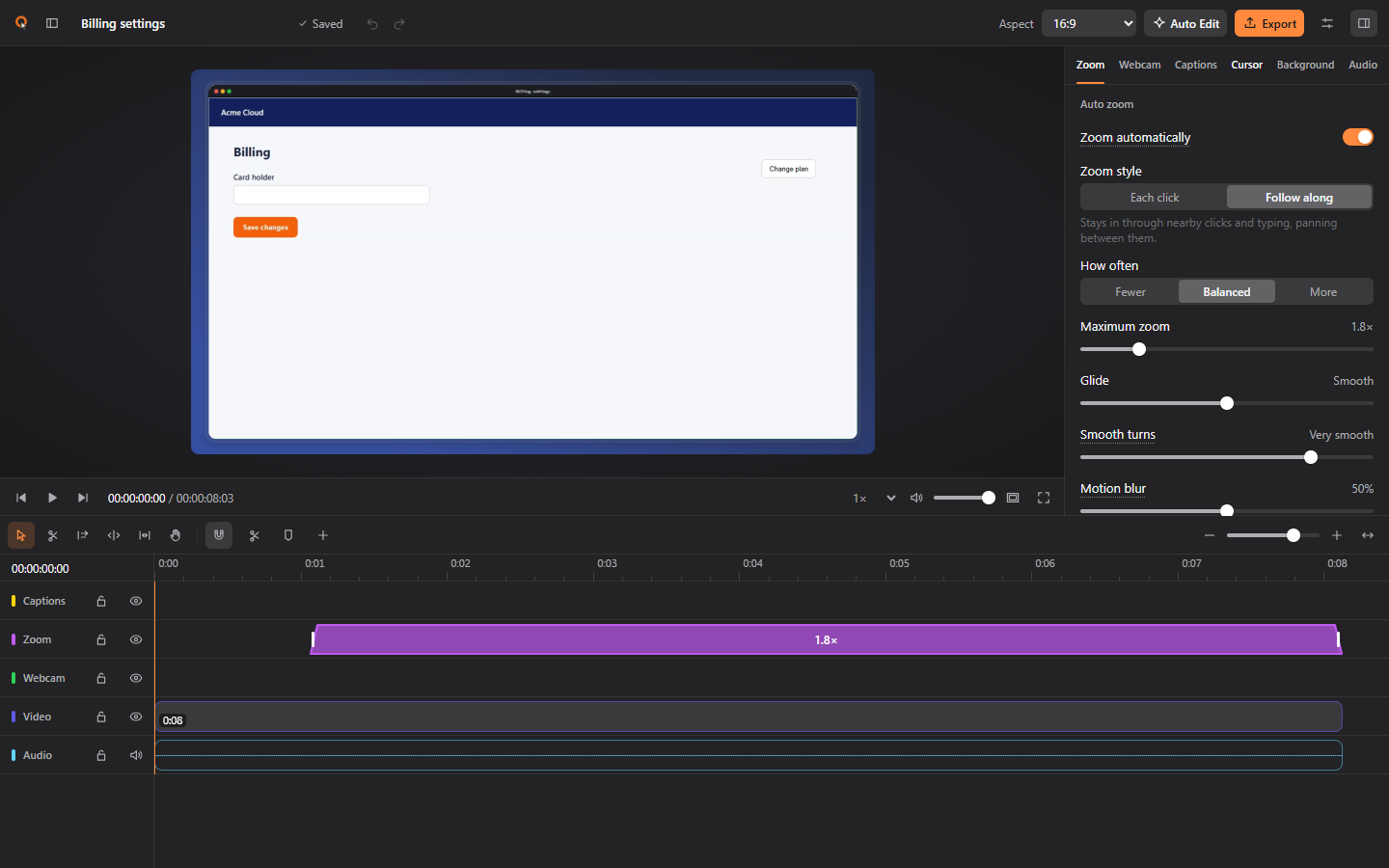
Your recording opens ready to go: zooms placed, cursor smoothed, background styled. Change anything on the timeline, or don't.
Nothing leaves your computer.
Wekiflo has no servers to send your work to. Recording, editing, captions and export all run on your machine, and your license is checked there too.
- No uploads, no cloud processing
- No account, no sign-in
- No analytics or tracking in the app
- Works offline
- Sensitive fields like emails and card numbers can be blurred
- Typed text is never recorded as data, only that a key was pressed
Start free. Upgrade when it earns it.
Free
$0
- Unlimited recordings
- Automatic zooms, smooth cursor
- Backgrounds, frames and editing
- Export up to 1080p, 30 fps
- Auto Edit on 3 recordings a month
- Small "Made with Wekiflo" mark
Pro
Most popular$108 a year
- Everything in Free
- No watermark
- 4K and 60 fps export
- Unlimited Auto Edit
- Caption files (SRT, WebVTT)
- Webcam background blur
- Tab and system sound, presets
- The Windows app (Mac in testing)
- Commercial use
Prices in US dollars. Sales tax or VAT may be added at checkout. 30-day money-back guarantee on every paid plan.
Install it in a minute.
Mac and Windows
The desktop app records any app on your computer and zooms on the files, folders and buttons you click. Included with Pro and Lifetime; the download link comes with your key. Windows now, Mac in testing.
How license keys workAre my recordings uploaded anywhere?
No. Wekiflo records, edits, transcribes and exports on your computer. Your recordings never leave it, and the app makes no network requests while you use it.
Do I need an account?
No. Install it and start recording. If you buy Pro or Lifetime, you'll get a license key by email; you paste it into Wekiflo and it's checked on your computer.
What does the free plan include?
Unlimited recordings, automatic zooms, the smooth cursor, backgrounds and frames, and editing. Exports go up to 1080p at 30 fps with a small "Made with Wekiflo" mark, and Auto Edit works on 3 recordings a month.
What can it record?
A browser tab, a Chrome window, your whole screen, another app window, a region, or just your camera, with your microphone, webcam and computer sound.
Which browsers and computers does it work on?
The extension runs in Google Chrome; Microsoft Edge is coming soon. The Windows app comes with Pro and Lifetime, and the Mac app is in testing and will be included too.
Can I get my money back?
Yes. Every paid plan has a 30-day money-back guarantee. Email us and we'll refund you in full.
Start free. Upgrade when it earns it.
Unlimited recordings, automatic zooms and the smooth cursor on the free plan.